
Thursday, December 30, 2010
Intel have just announced their brand new 310 Series of Solid State Drives (SSDs), and they’re happy to show off the ridiculously small size. Best of all, though, is that the company managed to pack in all of the same features and power of the x25-class of SSDs that these are meant to replace.
 As Intel puts it, the new 310 Series of SSDs are able to deliver Intel x25-based performance, all in a package that comes in at one eighth the size of its predecessor. The ultra-compact design makes it possible for the SSD to have accelerated performance with higher-capacity hard drives in dual-drive notebooks. And Intel is quick to point out that the new SSDs are perfect for tablets, as well as military-grade or low-power, rugged, embedded apps. Not surprisingly, Intel is already showcasing the SSDs to potential buyers, pricing the 40GB model at $99, and $179 for the 80GB version. Check out the full press release below for more information. And check out the video below to see what Lenovo thinks of the new 310 Series.

Monday, November 15, 2010
Hybrid Batteries Last Twice as Long, Charge in Seconds
Some new batteries have been created by a company called ioxus that are capable of running a gadget for twice as long as a regular battery on a single charge. To add to that, the batteries have a charge time of just 90 seconds allowing you to easily charge them minutes before you need to go out somewhere.

If you charge the batteries for 20 seconds you get a partial charge when compared to the full 90 seconds.
It is expected that when launched, these particular batteries could power household gadgets such as kids toys, drills and other items around the house that use smaller types of batteries.

There is a trade-off though as the batteries last around 20,000 cycles which is a lot less than the "millions" of cycles possible with rechargeable batteries. But, with this being a different step in how batteries work, we are confident the company will up the number of cycles over the coming years.
Wednesday, July 14, 2010
Nokia Terminal Mode Demoed by Volkswagen [Video]
Volkswagen, the car maker released a video demo earlier today, showing how simple Nokia's Terminal Mode is to use.
With a vehicle supporting the technology, simply connect your Nokia device to your in-dash terminal, and navigate your phones screen, and menus via your car's inbuilt monitor. Enjoy!
With a vehicle supporting the technology, simply connect your Nokia device to your in-dash terminal, and navigate your phones screen, and menus via your car's inbuilt monitor. Enjoy!
Friday, July 09, 2010
Intel Working on Black Box for Your Car

At a series of press events last month, Intel demonstrated some of its auto-oriented technologies, including an event recorder, or so-called black box, which Congress is pushing as part of a piece of auto safety legislation inspired by the Toyota unintended acceleration issue. Intel sees such a black box as a natural part of its Connected Car research.
To show off how it works, Intel outfitted a Smart Fortwo with WiMax, the 4G wireless system that can provide high-speed data and Internet connections to anything that moves. As part of the system, Intel’s event recorder would be able to record basic telemetry of the vehicle and information like whether the seat belts were being used at the time of an accident, and a whole lot more.
“With new vehicles, there will very likely be video cameras inside and outside,” said Intel’s chief technology office, Justin Rattner, in an interview. “It’s not particularly new or stunning, but when you combine the cameras with GPS, you’re geo-tagging the video.” Essentially, the Intel event recorder would record 30 seconds or more of video and know exactly where and when an accident occurred.
While Mr. Rattner doesn’t expect the videos to be sent directly to insurance companies, they do make it easier for the police and insurance investigators to reconcile discrepancies in eyewitness accounts.
The event recorder would also be tied directly into a car’s existing computer control modules, so that investigators would know when or if the brakes were applied, for example, or if there was some mechanical malfunction. With sophisticated computer vision systems, the event recorder would also be possible to see what a traffic signal indicated at the time of impact or whether the driver ignored an important road sign, like driving the wrong way on an exit ramp.
Other applications could also be tied to the connected car, including remote start, the ability to report the position of potholes to local road crews and the ability to send a video of a car thief directly to the owner’s cellphone.
But just how much would such a fancy black box cost? Mr. Rattner said reports of such a device increasing a car’s cost by thousands of dollars were unrealistic, even though car event recorders could potentially be more sophisticated than airplane black boxes (which do not record video, for example).
“Most of the hardware costs will already be in these vehicles,” said Mr. Rattner, pointing out that drowsy driver warning systems and parking assist packages in luxury cars already deploy several video cameras. Within a few years these are likely to be standard features, with lower costs.
“Even in the aftermarket, I would be surprised if it cost more than a decent security system or navigation system in a few years,” he said. And we all know what’s happened to the price of navigation systems.
Monday, July 05, 2010
Mouseless – An Invisible Mouse

The computer mouse has advanced over the years by trimming down a little, becoming optical, becoming more responsive and becoming wireless to name a few advances. The next step is to get rid of the mouse altogether and have an invisible mouse, also known as Mouseless.
The concept was created by Pranav Mistry along with Patti Maes and Liyan Chang and basically gets rid of the mouse completely.
By using an IR sensor with some custom software, the movements of a hand on a desk can be interpreted in to mouse and finger movement allowing users to simple glide their hand on a desk and tap the desk with their finger.
The IR sensor sits on the back of a laptop and detects movement to the side of the laptop. By skimming the IR beam across the desk the software can pick up where the signal is cut off and calculate where your hand is and move the mouse pointer appropriately.
The system costs just $20 to build which is interesting and would allow laptop users to more comfortably work as well as carry less around when out and about.
The video below shows a demonstration of how the software works and how accurate it is. It's fairly impressive stuff and would be good for companies to adopt in the future.
Sunday, May 09, 2010
ED Lights serve for an Energy Efficient Planet

We all want to cool our planet, we all wanna be a part of “Global Cooling” and fight “Warming”. Nowadays more products are released which is eco friendly than its previous version. Most of the electronics gadgets now use “Green” components which can be recycled later and serves the purpose without any harm to our environment. One such product is “LED Lamps”. An LED lamp is glorified for its energy conservation compared to its predecessors CFL and Incandescent. A study by Carnegie Mellon and Osram gives us a good insight into this and it helps us to defend the controversies.
First point is 98% of energy consumed by LED is emitted out as light and only 2% is used for light production. Next point is lifetime, an LED lamp is observed to have a lifetime of 25,000 hrs, where as a CFL has only 10,000 hrs. An incandescent lamp serves the humans for only 1000 hrs, so it needs 25 incandescent lamps to equate 1 LED lamp. This clarifies LED’s are more energy efficient and we can cut down energy consumption by 25 times (old days @ incandescent times). At present an LED may produce upto 30lumens/watt and research shows that in near future upto 150lumens/watt is possible. A comparison of energy consumption in KWH shows that an incandescent lamp consumes 24 times that of an LED and a CFL consumes 3 times of an LED. So LED proves its efficiency again here and underlines its stand to serve an energy efficient planet. AS of now LED’s are much efficient as CFL’s and we hope LED will overtake this position as LED lighting technology is still on its way to full realisation and a lot of promising research is going on in this area.
Note: This article is written by Mr. Sam Mathew who is an author of Circuits Today
Thursday, April 29, 2010
ASUS 890FX Based Motherboards

Asus yet again outs optimized result to completely adhere to the influent profession from AMD. With reason for the new six-core CPU decoration, the selective features which add to the Asus 890FX motherboards are susceptible of realizing the hexa-core architecture’s capabilities to the fullest.The ROG Crosshair IV Process as recovered as M4A89TD PRO packs in [Read More]
Wednesday, August 26, 2009
Corsair Unveils High-Performance X256 SSD drive
Computing enthusiasts seeking for high-performance storage solutions can now look forward to Corsair’s recent SSD drive. Dubbed as the new Extreme Series X256, this SSD is the latest addition by the company to its existing SSD line. This 256GB drive is exclusively designed for users who do not wish to compromise on its overall performance.

This Corsair creation adorns the renowned Indilinx Barefoot controller and Samsung MLC NAND flash memory, this combination offers high-levels of performance to its users. Flaunting impressive read speeds of up to 240MB/s and write speeds of 170MB/s, this drive has a 2.5-inch form factor.
“Since the launch of the Corsair Extreme Series SSDs in June we’ve had a fantastic response from customers who love the high-performance and reliability, and we’ve regularly been asked for even higher capacity models.” shared Jim Carlton, VP of Marketing at Corsair. “The new 256GB Extreme Series X256 is a response to the growing popularity of high-capacity SSDs, and it joins our Performance Series P256 at the top of its range, for enthusiasts who want the fastest speeds and plenty of space available for their pictures, music, and videos.”Joining the company’s X32, X64 and X128 SSD solutions, the novel X256 offers 64MB of cache which further boosts the performance. Also, according to the company its new series of SSDs features end-user upgradeable firmware that enables users to add new features like the imminent TRIM command for Windows 7 as well as other operating systems.The pricing and availability of the Corsair X256 SSD drive is not yet known.
Wednesday, August 05, 2009
LEDs are far more better than incandescents

LEDs are by far more efficient than incandescents and even CFLs while being used as a light source, but what about over their entire life cycle? Until a recent study, there had been doubts that the technology could claim the title of "most efficient" once you factored in production.
A new study conducted by Siemens Corporate Technology Centre for Eco Innovations and released by lighting company Osram claims to put those doubts to rest. The study compared the life cycle energy use of one 25,000-hour LED lamp to that of 2.5 10,000-hour CFLs and 25 1,000-hour incandescents.
The report states that the energy needed to make, ship, install, use and then recycle LEDs was about equal to CFLs and much less than incandescents. While the report didn't go into the technical details of the study or release specific numbers, Osram says it will release all of that information in the fall with support by three independent analysts.
Monday, July 27, 2009
WD Scorpio Blue 1TB SATA 2.5-inch hard drive
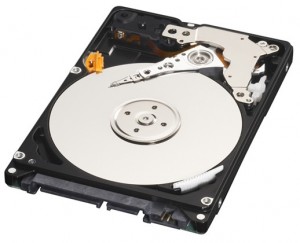
Western Digital have created the highest capacity 2.5″ with a 12.5mm form factor hard drive. The highest of the 2 new drives can store 1TB of data and uses a 333 GB per platter technology. As well as a 1TB model being available WD will also create a 750GB model which I assume uses 3 x 250GB platters.
The drives are designed to be used in portable computers such as laptops and will provide a huge amount of storage space allowing for media to easily be carried around.
The WD Scorpio Blue drives run both quiet and cool and have a 3GB/s transfer rate.
“The convergence of the growing mobile computing and digital media trends produces demand for desktop-like capacities in portable devices,” said Jim Morris, senior vice president and general manager of client systems at WD. “Our new WD Scorpio Blue drives enable people to take even more of their digital collections with them wherever they go and, realizing the value of their data, back up their notebooks on their My Passport drives.”
WD Scorpio Blue Features
WhisperDrive™ – WD’s exclusive WhisperDrive technology combines state-of-the-art seeking algorithms to produce one of the quietest 2.5-inch drives available.
ShockGuard™ – Leading-edge ShockGuard technology combines firmware and hardware advancements to meet the highest combined shock tolerance specifications required for mobile and notebook applications.
SecurePark™ – Parks the recording heads off the disk surface during spin up, spin down and when the drive is off. This ensures the recording head never touches the disk surface, resulting in improved long-term reliability due to less head wear and improved shock tolerance.
The 1TB drive will cost $249.99 when launched while the smaller version will cost $189.99. Each has a 3 year warranty.
Wednesday, June 03, 2009
Google Wave - Upcoming Product From Google

Recently Google previewed the most important product of this year, Google Wave. In simple Google Wave is an application to empower the communication over web. Google Wave comes with lot of amazing features that we may not have even imagined. As I said Google Wave is mainly a communication application. So it can be compared to Gmail. But it total different from an E-Mail system from its basics. Also Google Wave has lots of more features than an E-Mail has. To know more about Google Wave see the Developers Preview Video Here
Saturday, May 23, 2009
New iPhone on its way
Latest reports saying that a new version of Apple iPhone is going to hit the market during the month of July. As usual Apple keeps the suspense by keeping everything secret. But tech geeks are saying that as Apple is doing an immense work to give the users of Apple iPhone a very interesting list of features they are looking for and also they are not even dreaming of. Some geeks gives some kind of features that is coming with the new version is listed below

- 32 GB Storage
- Double the RAM and Procesing Power
- A 3.2 MP Camera with video recording capabilities
- Software Upadte for Apple iPhone
- Send Pictures and Video via MMS
- Longer Battery Life
- Apple Logo on the rear side will light up
- FM transmitter
- Physical Changes
Tuesday, July 15, 2008
Keyboard Made Of Gold
Check out pictures of some computer keyboards from Japan that are made of pure 99.99% gold. They are real.


Top CD / DVD Burning Tips and Tricks to Avoid Coasters
 Today CD / DVD burners are a standard component in every computer be it a Desktop or a Laptop. The CD / DVD media is the most affordable and most easily available backup options that we have today. But many times we end up creating discs that are either not readable, fail to read after a period of time and ofcourse the dreaded coaster. Well now you would be wondering what this term coaster is that I keep referring.
What is a CD / DVD Coaster?
Well coaster can be defined as a unreadable disc, a badly burnt disc or a disc with lot of errors.
CD / DVD Burning Tips and Tricks to Avoid Coasters:
1. Check if your CD /DVD writer has the latest firmware: Always make sure that your CD/ DVD burner has got the latest firmware. The latest firmware offered by manufacturer of your drive would have support for latest blank CD / DVD medias and bug fixes if they were present in the earlier version of firmware.
2. Always use good quality media: Those nameless flashy cheap CD / DVD are no good. The quality of these cheap media is very poor so if you use those then you are risking your backup data. It is recommended that you buy branded media that can offer good results.
3. Take care of your Media: Buying good quality media alone is not sufficient, you must also take precautions that these media don’t get damaged. Keep the blank CD / DVD media away from sunlight and dust. Before you put the blank CD / DVD media into your burner make sure that they are clean.
4. Burn at lower speed: Burn at lower speed to get the best quality burning rather than burning at max speed or using overspeeding than the rated speed. I have noticed that the slower I burn the better quality of burns I get when compared to the max rates speed. I don’t mean that you have to burn you media at 1x speed, if you have 16x rated media try to burn at 12x which is quite optimal and you also don’t loose lot of precious time.
5. Defragment your hard drive: To get the best quality burns your CD / DVD writer needs to get data at the desired speed at required rate. To achieve this the hard disk drive would need to transfer the data at that rate hence it is advisable to have your data defragmented so that hard disk drive can transfer the data without any hiccups. Even if you set the max burning speed the burn rate will slower if the data is highly fragmented.
6. Close the programs that you do not use: The CD / DVD burning is more of hard drive taxing job rather than the CPU, close all those hard disk hogging programs that you don’t intend to use. To make the burning smoother the CD / DVD burning program uses quite some RAM if you are running low on RAM close all the unwanted programs that would free up more memory to the burning application.
7. Enable DMA for CD / DVD drives: The DMA mode allows the CPU to transfer huge chunks of data to the drive thereby reducing the CPU utilization. If this mode is enabled then high speed and high quality burning can be performed.
8. Make your CD /DVD drive as Master: If you are using IDE or PATA based CD / DVD burner then it is a wise decision to make that drive as master drive to get better performance.
9. Opt for SATA based DVD drive: Planning to buy a new drive? If yes then it is better that you a SATA interface based drives as it offers better performance over its PATA counter part.
8. Enable buffer under-run protection: Enable the buffer under-run-protection in your burning application before you burn your data.
A buffer underrun occurs during recording if the recorder runs out of data in the recording buffer. Once the laser is on, it cannot stop and resume flawlessly; thus the pause necessitated by the underrun can cause the data on the disc to become invalid. Since the buffer is generally being filled from a relatively slow source, such as a hard disk or another CD/DVD, a heavy CPU or memory load from other concurrent tasks can easily exhaust the capacity of a small buffer. Therefore, buffer underrun protection was implemented by various individual CD/DVD writer vendors. With this technique, the laser is indeed able to stop writing for any amount of time and resume when the buffer is full again. The gap between successive writes is extremely small.
Modern burners and burning applications by default enable the buffer underrun protection but it is always better to double check it before you start your backup or burning project.
9. Use Ultra DMA (80-Conductor) IDE/ATA Cables: If you are using a PATA or IDE CD / DVD drive use the 80 pin ultra DMA IDE/ATA cable over the 40 pin cable as it offers better performance.

Image courtesy: Seagate
If you got any more tips then do let us know we will update those here.
Are flying cars soon to become reality?

Sir Clive Sinclair who gave the world the Spectrum computer and the C5 electric car has told BBC Radio 4 that soon it would be “economically and technically possible” to create flying cars.
As well as saying they were technically possible, he also said that they would have to be automatically controlled because “we can’t all learn how to fly” (try stopping me!)
But since he also added that these cars would have to be electrically powered instead of petrol powered, you can tell right away who will resist the building of them. Yep, that’s right - the oil companies! So that pretty much dooms the project from the get-go.
Plus I’m pretty sure the bird union will have something to say about it too. How’s a self-respecting sparrow supposed to do its flying about and dropping its waste on people’s heads when there’s flying cars whizzing past left, right and center? Come on!
Casio introduces the world’s slimmest* digital camera with a wide-angle 4x optical zoom
Features CCD-shift anti-shake function and a large 3.0 inch LCD display
Casio America, Inc. announced today the release of the newest model in its EXILIM® digital camera series — the stylish, slim EXILIM Zoom EX-Z150, which features a wide-angle zoom lens, a CCD-shift anti-shake function, a 3.0” LCD monitor and an 8.1 effective megapixel resolution.
The EXILIM Zoom EX-Z150 contains the features and functions needed to meet the demanding requirements of today’s digital camera users, all within a slim form factor. The EX-Z150 comes complete with a built-in wide-angle 28 mm (35 mm film equivalent) and 4X optical zoom lens, at just .79” thick (.74” at the thinnest section).
“This camera is the perfect accessory for the picture taking enthusiast as it is compact, attractive and comes equipped with face detection technology which is a popular feature,” said Bill Heuer, Vice President of Casio’s Digital Imaging Division. “The EX-Z150 stays true to the user-friendly features that have become standard to the EXILIM Zoom series.
To complement the slim, stylish look, the new EXILIM offers all the premium functionality you would expect in a much bigger digital camera, including a CCD-shift anti-shake function and face detection technology. It also features a large 3.0 inch LCD monitor, a first for the EXILIM series, making it even easier to compose shots and adding to the fun of viewing the images taken.
MAIN FEATURES OF THE EXILIM ZOOM EX-Z150
· 8.1 effective megapixel model for high resolution photography
· Slim, compact size: 3.81” wide x 2.26” high x .79” thick (.74” at the thinnest section)
· 28 mm-equivalent wide-angle 4x optical zoom lens enables users to conveniently photograph scenes such as tall buildings or get shots of big groups of people in a small room, while still allowing zoom photography to capture distant subjects
· CCD-shift anti-shake function for beautiful image quality, free from effects of camera-shake
· Face detection technology that senses people's faces
· Large 3.0 inch, high resolution LCD monitor with 230,400 dots
Saturday, April 26, 2008
inflatable Massage Chair
inflatable Massage Chair

Here's a first: a bargain-priced inflatable massage chair that can be taken anywhere — great for the hotel room. This massage chair includes three intensity levels, nine functions, timer control, repair kit, and remote. The electric pump (included) inflates this chair in just one minute.
Transfer Information Via Handshake - Smart Rings

These rings add a gripping new meaning to “shake on it”.
Each “smart” ring stores your details, transferred there via a digital business card the size of a credit card. To pass along your details to a new business associate, simply shake hands, instead of handing over a traditional business card. It also displays a contact list of all the people you’ve exchanged information with – personal info, contact numbers, and for those with short memories, the date you met. All information is customizable, and transferable to anyone wearing another “smart” ring.
To view the information, sync the ring back to the digital business card. No batteries required either; the rings are juiced up by body heat. The entire business world will have to get one of these for the trend to take off in a big way, but even from where I’m sitting, the possibilities are mind-blowing.
Each “smart” ring stores your details, transferred there via a digital business card the size of a credit card. To pass along your details to a new business associate, simply shake hands, instead of handing over a traditional business card. It also displays a contact list of all the people you’ve exchanged information with – personal info, contact numbers, and for those with short memories, the date you met. All information is customizable, and transferable to anyone wearing another “smart” ring.
To view the information, sync the ring back to the digital business card. No batteries required either; the rings are juiced up by body heat. The entire business world will have to get one of these for the trend to take off in a big way, but even from where I’m sitting, the possibilities are mind-blowing.

Data Transfer Via Hand Shake 2 - Firmo
Previously we’ve featured Smart Things that transfer your data. It’s 
like in those spy movies where two agents shake hands, then part immediately after, totally baffling the enemy agents as to how they transferred the information. Well, we just gave away the secret. The Nippon Telephones and Telegraph company has developed a device that transmits data across the surface of the human body. The device can let users communicate with electronic devices just by touching them.
You wont have to undergo surgery of any kind to achieve this super power. The new product, called Firmo, is a card-sized transmitter carried in the user’s pocket. The card converts stored data into a weak AC electric field that extends across the body, and when the user touches a device or object embedded with a compatible receiver, the electric field is converted back into a data signal that can be read by the device.
For now, Firmo transfers data at 230kbps, but NTT is working on a low-cost 10Mbps version that can handle audio/video data transfers.

like in those spy movies where two agents shake hands, then part immediately after, totally baffling the enemy agents as to how they transferred the information. Well, we just gave away the secret. The Nippon Telephones and Telegraph company has developed a device that transmits data across the surface of the human body. The device can let users communicate with electronic devices just by touching them.
You wont have to undergo surgery of any kind to achieve this super power. The new product, called Firmo, is a card-sized transmitter carried in the user’s pocket. The card converts stored data into a weak AC electric field that extends across the body, and when the user touches a device or object embedded with a compatible receiver, the electric field is converted back into a data signal that can be read by the device.
For now, Firmo transfers data at 230kbps, but NTT is working on a low-cost 10Mbps version that can handle audio/video data transfers.
Sunday, January 06, 2008
HP Brings New Set Of Gadgets For You
including a revamped MediaSmart Receiver, a slim PC, multimedia notebook, storage, and monitors.

MediaSmart Receiver x280N
Hewlett-Packard continues to emphasize both traditional PC technology along with newer, crossover consumer electronics--all of which center around the explosion of media in the home. The latest innovation: The $300 HP MediaSmart Receiver x280N, which streams music, photos, and video from one (or several) Windows systems to any HDTV, in HP's bid for a piece of the digital media adapter pie. This media streaming box works as a Windows Media Center Extender; it also has an HP Pocket Media Drive bay and two USB ports, so you can also store and access content without streaming from a PC. The unit connects via ethernet and 802.11 a/b/g/n; and has HDMI (up to 1080p), component video, and digital audio outputs.
MediaSmart TVs Get Smarter
HP may not be the first name you think of for TVs, but the company is the first with connected TVs. HP has refreshed its MediaSmart TVs: All models are now 1080p, connect via ethernet and 802.11 a/b/g/n, and have built-in extenders for Microsoft's Windows Media Center (you can access multiple online services via this connectivity, including downloading movies from CinemaNow). The included remote control can handle up to four entertainment devices; the TVs now have three HDMI ports. The 42-inch SL4282N will sell for $1900; and the 47-inch SL4782N will sell for $2400.

Data Saver: New MediaVault
The HP MediaVault line gets a much-needed boost with this user-expandable storage system. The mv2100 and mv5100 series are aimed at homes and small businesses, respectively (the former, a two-bay unit, tops out at 500GB; the latter--a multibay unit referred to as the Media Vault Pro--comes in 1TB and 1.5TB versions). The Linux-based network-attached storage devices pack a Marvell processor for improved performance, and both models borrow features from HP's MediaSmart server (such as securely sharing images via Photo WebShare and easily accessing music via iTunes server).

$1000 PC Packs Blu-ray, Too
Not so long ago, Blu-ray Disc playback was a premium feature on a PC. The HP Pavilion Slimline s3330f PC--the most interesting of HP's three PC announcements here at the Consumer Electronics Show-- comes in at under $1000, and delivers a dual-format Blu-ray Disc and HD DVD drive (which might be useful for those of you with HD DVDs lying around). The space-saving s3330f is notably slim--HP says it's a third of the size of an ordinary PC tower. Even so, this model still manages to squeeze in a Pocket Media Drive bay. The unit also comes with a digital TV tuner, plus an Nvidia GeForce 8500 card with HDMI out.

Amped-Up Mobile Graphics
The HP Pavilion HDX series notebook gains a major upgrade: The option of integrating 512 MB Nvidia GeForce 8800M GTS graphics. This top-of-the-line mobile chipset from Nvidia--announced in late November 2007--should provide significantly better frame rates for gameplay, to the point that previously unplayable games may now be enjoyed in a notebook PC (Alienware has already announced it will use this chipset in notebooks due out this quarter). Another first: The HDx now has a 20.1-inch WUXGA XHD Ultra Brightview display. Plus, this model also now supports both Blu-ray and HD DVD.

Subscribe to:
Posts (Atom)
